We have been struggling with zooming TextArea in Flex for 2 months now. Tried lots of combination but nothing worked. Can someone help?
Essentially, we scaleX and scaleY the TextArea as the zoom level changes. The component zooms in fine, but the text in it keeps wrapping as we keep zooming. We expect the text to stay as it is and just zoom. Not re-wrap.
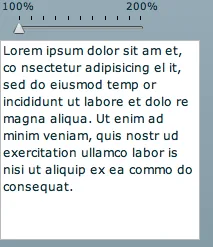
Here is the text at 100%. Notice the last words on the lines.
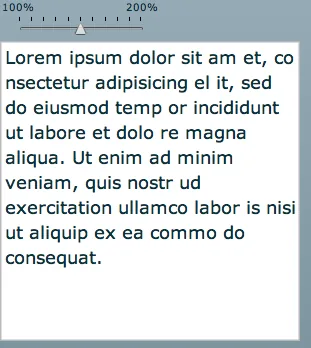
Here is the TextArea at 150% zoom. Notice how the wrapping disrupts.
I had a live example here if you wanted to try this out. It is no longer available.
We have tried using zoom effect, adding line breaks at the end of each line before zooming and removing them, trying different fonts, embedding them - everything we could think of! But this looks like a bug! TextArea keeps wrapping the text as we zoom.
What could be a solution?
maliboo
Try embedFonts=true
James Urquhart
My Flex is very sketchy, but have you tried embedding the text area into another control, *then* scaling that?
Till Schneidereit
That happens when you scale device fonts or embedded fonts with the antiAliasType set to 'advanced'.
For device fonts, it's because the Flashplayer can only tell the OS to scale the font to integer values, causing the glyphs not to scale smoothly during a scaling transition.
For embedded fonts with antiAliasType 'advanced' it's caused by the font engine optimizing the glyphs and text runs for readability, e.g. by changing the hinting for different (rendered) font sizes.
Solution: Embed the font and set the antiAliasType to 'animation'.
maliboo
+antialias for animation!
Nirav
Thanks Till and Maliboo. Setting "animation" for anti alias solved the problem. The zoom works well now!
Whew!
angelo
Nirav, please can you send me a simple example. I've tried what you suggested but i can't access to the antiAliasType property of textArea component.
thanks in advance !
Gaurav Vichare
How to prevent Browser Defaults(ctrl+c, ctrl+p etc) in Flex especially in Internet Explorer?
Travis
This is for anyone who may ever have this problem, within Flex now the property you want to set is fontAntiAliasType="animation"
Binu Moothedan
Nirav/Travis
The only available enumeration values for fontAliasType are "normal" and "advanced". How did you set "animation" as the value for the fontAliasType?
Thanks in advance!
Nirav
We did it via Action Script.
Zachary Berry
var tf:TextField = textarea1.mx_internal::getTextField();
tf.antiAliasType = 'animation';
mike
fontAntiAliasType=”nomal” is the answer in Flex
Kipp
Greetings,
I wrangled with this for several days. By combining a few of the suggestions above you can solve the problem.
Summary: When you don't embed a font, Flex does rely on the OS to scale the font and most OS's don't do continuous scaling. You get stepped scaling and that causes the text reflow.
Solution: You to embed a font for the text/text area controls and then set the fontFamily style for the control as that embedded font.
Embed the font in a style block or CSS file.
@font-face {

src:url("MyriadWebPro.ttf");

fontFamily: "MyriadWebPro";

fontWeight: normal;

fontAntiAliasType:"animation"

}
And assign via action script:
YOURTEXTCONTROL.setStyle("fontFamily", "MyriadWebPro");
Nirav
Thank you Kipp. That is awesome!