Entrepreneur Geek

Nirav Mehta on life, technology and future

Archive for the ‘paypal’ tag

Importing Paypal transactions into Tally accounting software

with 2 comments

We use Paypal to receive payments from customers. We maintain our financial accounts using Tally. Imagine copying over Paypal transactions into a separate accounting software – manually. You are creating all ledger accounts one by one. Ensuring spellings are correct, accounting heads are right and you are not missing any names in between. You’re numb by the time you’ve created 500th account, but still have another 500 to go. You drag yourself through the process. Over the next few days, you create sales and receipt vouchers for each sale. But hey, did you forget that the sales are in US Dollars, but income tax returns have to be filed in Indian Rupees? You now convert all amounts to suitable Rupee values. You probably use some Excel formulas to make it easier, but you still need to get those entries in Tally. Few more days of work, uh?

Urgh… It would be a nightmare to do this manually

This is the first financial year where we are submitting our returns, and I wanted to make sure everything is impeccable. My wife has extensive experience with Tally and she told me she could quickly make these entries.

I laughed, I knew it was not so easy, and that she was over optimistic!

There is no way this is done manually, I said to myself.

Lazy Programmers Automate Things

Being a lazy programmer, I wanted to automate this. Automating mundane tasks like this has numerous advantage. First, we will save a lot of data entry time (and headache). Second, we will save this time and headache every time in future we wanted to bring our accounts up to date. Third, it will avoid data entry errors. And forth, I will get to learn a bit more of Tally.

(To give you a bit of background on this, I have graduated in Commerce with Bookkeeping as my main subject, but I don’t remember any of it now. I always liked programming better! At the same time, I pity the accountants, seeing them working doubly hard just copying data from one source to another.)

It was my long time dream to import data in Tally. I was always told it’s possible to export from Tally to Excel, but not vice versa.

Time to break the myths!

Strategy 1: Import Excel Data to Tally

I looks around the web to find if someone else had similar problems and came up with some solution. And sure, I found UDI Magic by RTSLink.

RTSLink creates excellent software to import Excel to Tally, SQL Server / MySQL / DBF and virtually any database to Tally. The have a free utility called UDI Magic that allows importing Excel data to Tally.

I felt ecstatic. I found my solution so quickly! The next day, I downloaded UDI Magic and gave it a spin.

I found it worked really well. I could create ledger masters, sales transactions, stock transactions and a lot more with this software. It takes Excel data, converts it to XML and imports it to Tally using RTSLink DLL.

I decided I will convert my Paypal data to CSV. From CSV to Excel in a format UDI Magic can understand. And then to Tally.

This was a perfect solution. But had two problems.

  1. I will still need to convert Paypal data into a format UDI Magic could understand
  2. UDI Magic is a trial software. It works for 30 times / 30 days and expires.

Now I could keep installing it on different machines whenever I needed or try some other hackery to get around the expiry limitation. But I said, heck, why not be clean? Why not push my conversion system a bit further and convert to Tally XML itself?

Strategy 2: Solve the problem once and for all – Write a script to convert Paypal data (residing in MySQL) to UDI XML for Tally

I thought it would be easy. I know PHP and XML like the back of my hand. I can put together a converter in an hour.

Alas. It was not that quick. It took me 8 hours to write the converter. It still does not handle Purchases (I got tired, and did not have so many purchase transactions). But at the end of the day, I was able to import close to 600 master ledgers and about 900 vouchers in Tally in under a minute. That was sweet!

So how does this work?

Here is an overview

  1. Login to Paypal. Go to History. Download CSV reports – along with shopping cart details. If it takes too long to download full year’s transactions, download monthly batches.
  2. Download PaypalToTally.zip – unzip the contents to your local web server directory
  3. Create paypal_history table in your MySQL DB using paypal_history.sql file.
  4. Import Paypal transactions to this table using phpMyAdmin – Import Data.
  5. Ensure data is imported correctly. Fix problems if any.
  6. Configure database details and other configuration options in config.inc.php
  7. Make sure “data” folder is writeable (chmod 666)
  8. Hit the index.php via browser!
  9. Ensure generated XML files are valid. (You can open them with browser)
  10. Open Tally. Open the company you want to import to.
  11. Import Ledgers using Import Masters option under “Gateway of Tally”
  12. Verify it worked.
  13. Import transaction vouchers using “Import Vouchers” option
  14. Verify it worked!
  15. Enjoy!

Your Mileage May Vary

I wrote these scripts to solve a specific problem – import sales data from our Paypal account to Tally. Such that Tally shows all customers, their payments and products purchased. You will need to modify these scripts to suit your needs. These scripts support Web Accept Payments, Shopping Cart Payments and won’t record Refunded items. But they won’t import Purchases or simple Payments Received  / Sent (via Send Money tab in Paypal).

You can modify these scripts to import data from any database. If you add any features, do let me know!

Common Problems / Troubleshooting

  • Ensure the financial year is set correctly. Dates in import files must be within current financial year in Tally.
  • Make sure starting voucher number is set correctly. Vouchers won’t import otherwise.
  • If only some of the data gets imported (Tally quits importing at certain percentage), check the imported data. Find out last imported transaction. Locate it in the XML file. You have some problem with the transaction after this.
  • These scripts don’t import Purchase information yet.

Free Download

In a hurry? Download PaypalToTally.zip from here.

References

  • RTS Link website was extremely helpful. Especially their explanation of Sales vouchers XML and Receipts XML.
  • You may need a Tally expert around. My wife cleared some of my confusions about Debit and Credits ;-)

Using Paypal? You may like Putler

Do you use Paypal for your business? Then you may even like Putler – a Paypal Reporting, Monitoring and Planning tool.

Thank you, share your experiences

I hope these scripts prove useful to you. Thank you for trying them out! They saved us many days of work. If you like them, post a comment with your experience!

Written by Nirav

March 24th, 2010 at 11:09 pm

Entrepreneur’s Urge with Paypal, Putler brings the solution

without comments

Putler: Paypal Reporting, Monitoring and Planning tool for Windows, Linux and Mac

Putler: Paypal Reporting, Monitoring and Planning tool for Windows, Linux and Mac

If your business accepts payments via Paypal, chances are you login to the Paypal website a few times in the day to check your balance. You would even keep an eye on email alerts of new sales and feel happy when you close the day with good sales.

The Entrepreneur’s Urge

I can tell you from my own experience that I am on the edge of my seat when we launch a new product. I am biting my nails when we push “Send” on a newsletter with a special offer. I am curious to find out how much money I made while I was sleeping, and check my Paypal balance the moment I start my computer.

You may be a web entrepreneur, a microISV, a startup or an expert offering online courses. The urge to see how well you are selling is common to all. You may be looking forward to the first sale of your newly launched product or want to track your monthly performance against your targets.

The Problem

Logging in Paypal takes time. And if you keep it idle the session also times out quickly. Now this is good for Paypal, but bad for us. All we want to do is check the Paypal balance and find out what products are selling. We want some quick bits of information and get back to our work. The process of logging in and viewing details eats up time. And biggest, it distracts you!

The Solution: Putler

Now sure, you can write-up a small program that will check your Paypal balance. You could host it on your internal server and keep hitting it when you feel like satisfying your natural urge to check your Paypal balance! But why to make things complicated (and spend time understanding and building those scripts) when you can have someone give it to you on a platter?

Welcome Putler!
Putler shows your Paypal balance on your desktop, notifies you of balance changes, lets you set a target, shows today’s transactions and tells you how well are you doing against the target. It’s a simple and effective tool to watch your Paypal account right from your computer.

Just give your Paypal API information to Putler and he will start monitoring your Paypal balance. He will gently notify you when the balance changes. He even draws a nice chart of your daily balances along with a target you may have set.

This gives you a never before visibility on targets vs performance for your Paypal business account.

Apps Magnet Launches Putler Alpha. Get it now for free!

We are releasing a public Alpha of Putler today. Get it free, monitor your Paypal account, achieve business goals, and give us feedback!

Download Putler for free now!

We are starting with only the basic features, but will make Putler smarter and stronger as he grows! Do send in your ideas and suggestions on how we can make him better!

Thank you!

Written by Nirav

February 2nd, 2010 at 12:10 am

Paypal Sales + Marketing Activity Trend Spotting

with one comment

I’ve been using Paypal for AppsMagnet sales for a few months now. Paypal is easy to setup and competitive. And the biggest plus is that almost every e-commerce tool has support for Paypal.

Paypal gives you comprehensive business reports – weekly sales, monthly sales, transaction history, downloadable logs etc. But I did not see any sales graph! I searched a lot, but couldn’t even find anything that gives you charts and graphs from your Paypal sales data.

On a side note, I tried Mint / Quicken / Other online finance tools. None made much sense to me as a web entrepreneur trying to track product sales and sales trends.
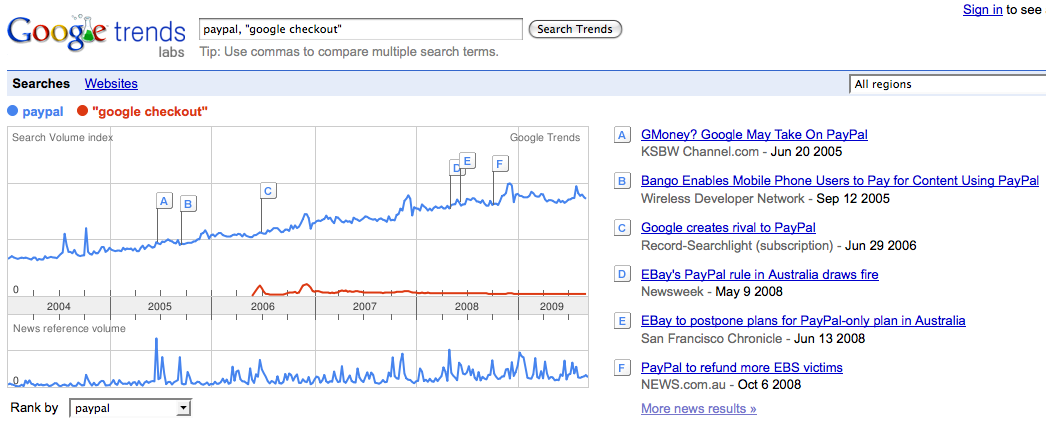
Google Trends matches search volume with news reports

Google Trends matches search volume with news reports

What I really want is to find out the impact of a new product launch / new tutorial video / ad / promotion on my sales. Surely, there are many tools that track this for affiliates. But what if I don’t have affiliates? What if I want to see sales number side by side my marketing activities?

May be something like Google Trends?

Have you seen something like this? How do you track your sales vs marketing activity?

If I don’t find something like this, I will have to build one!

Written by Nirav

September 22nd, 2009 at 3:09 pm